An ergonomic workspace is one where the desk, chair, screen and light adapt to your body, not the other way round. In practice that means a desk at elbow height, feet flat on the floor, the screen about an arm's length away with its top edge roughly a hand's width below eye level, glare-free light, and a layout that invites you to change position through the day. In a Zurich apartment, where every square metre counts, you can get all of this without giving up a beautiful room.
Below we walk you through the Swiss guidance (from the authorities that actually set it), then show how to turn it into a space you'll want to sit in. Because yes, a workplace can be healthy and look Wow.
Upscale Interiors
upscale.ch
Make Your Home Office Fit
Upscale Interiors designs bespoke residential spaces, bringing workspace planning into a home that feels considered and works for you.
TL;DR
- Set the desk surface to your elbow height with relaxed shoulders, and let your feet rest flat on the floor (or on an adjustable footrest).
- Place the screen straight ahead, about 50 to 80 cm away, top edge around one hand's width below eye level.
- Aim for at least 500 lux of general light, glare-free, with screens positioned so light comes in from the side.
- The best posture is the next posture: swap between sitting and standing and take short active breaks.
- In a small Zurich flat, an external keyboard and mouse plus a properly fitted chair matter more than an expensive desk top.
Why ergonomics is a design question, not just a furniture question
Most people meet the word "ergonomics" when their neck starts to hurt. By then the setup is already in place: a laptop on the dining table, a chair that was chosen for its look, a window behind the screen.
Swiss authorities describe the risk plainly. The SECO home office brochure points out that home office work is mostly screen work in the same seated position, and that a poorly arranged workstation can lead to uncomfortable postures and, over time, strain. That's exactly why we treat the workspace as part of the room's design from day one: the position of the desk relative to the window, the choice of lighting, the storage that keeps cables and clutter out of sight.
Good news: the rules are simple, and they are the same whether you work in a lakeside villa in Küsnacht, a flat in Zurich Wiedikon or a corner office in Zürich West.
The desk: height, depth and width
Start with the surface, because everything else depends on it.
Get the height right first
According to the guidance from SECO and EKAS, the work surface should sit at your elbow level when you're seated with relaxed shoulders. Your forearms then rest roughly horizontally and you aren't hunching or shrugging to reach the keyboard.
The same document stresses that everyone is built differently: it isn't only body height that counts, but also the length of your limbs. That's why a desk that suits your partner may not suit you, and why we always ask who will actually use the room.
Depth and width
The Swiss guidance recommends a desk at least 80 cm deep and at least 120 cm wide, ideally 160 cm. The depth gives your eyes room to sit at a comfortable distance from the screen; the width lets you place a keyboard, notebook and documents without twisting.
Here's the honest part. A 160 x 80 cm desk doesn't always fit in a Zurich flat. If you have to compromise, compromise on width before depth, and keep the elbow-height rule non-negotiable. A slim 120 cm desk at the right height beats a magnificent slab that forces your shoulders up.
The chair: your most important purchase
If you spend your budget in one place, make it the chair. The EKAS and SUVA practical tips on setting up table and chair start with seat height: set it so your feet stand flat on the floor. If that isn't possible once the desk is at the right height, use an adjustable footrest.
The research behind our brief gives a seat height range of 38 to 52 cm for office chairs, which is a useful check when you shop. Beyond height, look for:
- Lumbar support that actually meets the curve of your lower back. The SUVA tips describe the backrest's bulge for the lumbar spine, and it should sit where your lower back curves in.
- Adjustable seat depth, so the seat edge doesn't press behind your knees.
- Armrests that let your shoulders stay relaxed.
- A backrest that moves with you, so you aren't locked in one position.
In our experience, clients are often surprised that a well-fitted chair does more for long-term comfort than an expensive designer desk surface. Choose the desk for its look, by all means. Choose the chair for your spine.
Monitor height and distance
Monitor height is one of the quickest fixes, and one of the most commonly searched. The guidance is clear:
- Place the main screen directly in front of you.
- Keep it about one arm's length away, roughly 50 to 80 cm.
- Position the top edge of the screen about one hand's width below eye level, so your gaze falls slightly downward.
The EKAS material on screen workstations and the university checklist for screen workstations are good ways to check your own setup against these points.
Two screens
If you use two monitors, arrange them symmetrically and at the same viewing distance. If one screen does most of the work, put it in the centre and the second slightly to the side, so your neck isn't constantly turned.
Laptops
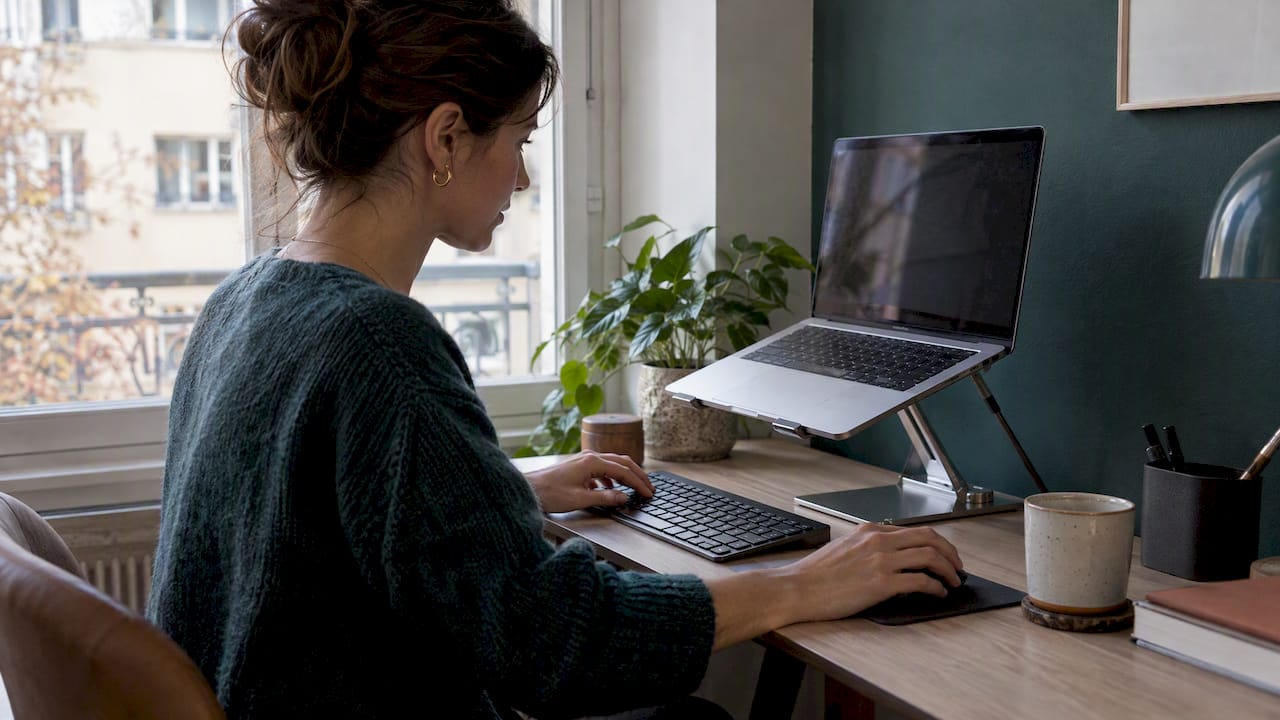
A laptop on its own forces a choice between a good screen position and a good keyboard position, and you can't have both. Raise the laptop (or use an external monitor) and add an external keyboard and mouse. It's the single most common upgrade we recommend for tight city home offices, and it avoids the forward-head posture that laptop-only work tends to produce.
Standing desk or regular desk?
This is the question behind "Stehschreibtisch vs Schreibtisch", and the answer is: neither wins on its own.
SECO and SUVA experts make the point that ergonomics isn't only about furniture, it's about movement. Even a perfectly set up office can lead to complaints if you stay static. What helps is changing position between sitting and standing, and building in short, active breaks.
So think of a height-adjustable desk as a tool for variety, not as a cure:
If you do stand, the same elbow-height rule applies: forearms roughly horizontal, screen top a hand's width below eye level. Standing all day isn't the goal. Alternating is.
SUVA's fit programme for people who sit a lot offers exercises you can do in the office or at home, standing or seated, with different levels. SUVA suggests doing them at least two to three times a week. It's a great companion to any new desk.
Light: the quiet part of ergonomics
Light is where interior design and ergonomics meet most naturally.
According to the Swiss guidance, general lighting in an office should provide at least 500 lux. Light should be glare-free and neutral white or warm white (roughly 3,300 to 5,300 Kelvin), and positioned so it doesn't reflect on your screen. The legal framework sits in the SECO commentary on lighting under the Ordinance 3 to the Labour Act, which also expects daylight in workrooms.
Three practical rules:
- Light from the side. The SECO, SUVA and SECO leaflet on working at a screen advises positioning screen and desk so daylight arrives from the side, which avoids reflections and glare. Don't face the window and don't sit with your back to it.
- Add a task light. The need for light grows with age, so an adjustable desk lamp is worth having for anyone who is older or has a visual impairment.
- Control the view, don't lose it. In lakeside or alpine homes with large windows, you don't want to close the curtains on the best view in the canton. Sheer or light-filtering window treatments, or blinds that can be angled, cut harsh light while preserving the outlook. This is one of those details that turns a standard setup into a bespoke one.
Ergonomics in a small Zurich home
Many of our Zurich clients don't have a spare room. They have a corner of the living room, an alcove or a bedroom wall. The research we draw on notes that a good workspace should still allow a clear mental separation from the non-work areas of the home, which helps work-life balance.
Some ways to do that without building walls:
- Use a partition or shelving to frame the desk area. Our magazine has elegant room divider ideas (in French) for exactly this.
- Fold the office into another room. Our article on integrating a home office into other rooms shows how a desk can live in a living room or bedroom without taking it over.
- Choose closed storage so that at 6 pm you can hide the work and reclaim the room.
- Think about sound. Shared flats and open-plan offices need calm, and our guide to office acoustics in Zürich covers the basics.
For a step-by-step overview of the whole room, see our guide to setting up a home office in 8 steps. If you'd like to see what compact, well-planned Zurich living looks like, take a look at our Stylish Studio Apartment and Modern Home projects.
Setting up an ergonomic office for your team
If you run a business in Zurich, the same principles scale up, with one big addition: people are different. The expert view we follow is that individualisation is the key to ergonomic success. There's no one-size-fits-all chair or desk height. Letting each person set up their own space is a proactive way to reduce long-term health risks and support productivity.
For an office, we'd work through this list:
- Adjustable chairs and, where daily screen work is the norm, height-adjustable desks.
- Screen arms or risers so monitor height can be set per person.
- General light of at least 500 lux plus individual task lights.
- Window treatments that manage glare without blocking daylight.
- Acoustic solutions and quiet zones.
- A layout that encourages walking, standing meetings and breaks.
You'll find more on how we approach this in our commercial interior design service.
Our perspective: ergonomics should feel like home
We design for people who care how a room looks, and we've learned that those same people are the ones most likely to compromise on comfort because "the chair looked so good". We don't think you have to choose.

As architects and interior designers, we see ergonomics as a layer of the plan, not an add-on. We place the desk in relation to the window before we choose the desk. We plan sockets and cable routes so the keyboard, monitor and lamp don't create clutter. We check seat height and elbow height against the people who'll use the room. Then we select materials and furniture that can do both jobs: carry your style and carry your body.
Our experience from more than 480 completed projects is that the best-working spaces are rarely the ones with the most equipment. They're the ones where light, proportion and furniture were thought through together. A small, calm corner with a properly fitted chair, a lamp you control and a view you can keep will beat a showpiece desk every time.
— Giorgia D'Amico
How we can help
If you'd like a professional eye on your workspace, there are a few ways to begin:
- A Consultation at 490 CHF (one-off) to talk through your room, your routines and your constraints.
- The Single Area Package at 970 CHF (one-off), ideal when the home office is the one room you want to get right.
- The Full Home Package at 3390 CHF (one-off), if your workspace needs to fit into a wider redesign.
All three can be done online, so you don't need to be in Zurich to start. For larger projects or offices, we offer individual offers; see our Zurich interior design page.
FAQ
How high should my monitor be?
The top edge of the screen should sit about one hand's width below eye level, so your gaze points slightly downward. Keep the screen straight ahead, about an arm's length (50 to 80 cm) away. With two screens, arrange them symmetrically at the same distance.
What is the correct desk height?
The desk surface should be level with your elbows when you're seated with relaxed shoulders. If you can't set the table to that height, raise the chair to suit your elbows and use a footrest so your feet still rest flat.
Is a standing desk better than a regular desk?
Not by itself. Swiss experts at SECO and SUVA emphasise movement: regularly changing between sitting and standing, plus short active breaks. A height-adjustable desk makes that easier, but a fixed desk with regular breaks can work too.
How much light do I need in my home office?
The Swiss guidance for offices is at least 500 lux of general lighting, with neutral-white or warm-white light that doesn't glare or reflect on the screen. Add an adjustable desk lamp, particularly if you're older or have a visual impairment.
Can I work ergonomically from a laptop?
Yes, if you treat it like a desktop: raise the laptop or connect an external monitor, and use a separate keyboard and mouse. That lets you set screen height and keyboard height independently.
If you have persistent pain in your neck, back or arms, please see your doctor or a physiotherapist. A good workstation helps prevent problems, but it doesn't replace treatment.
Sources
- EKAS: The 10 most asked questions about the office workstation
- EKAS: Occupational safety and health protection in offices
- SECO, SUVA: Working at a screen
- SUVA and EKAS: Practical tips for ergonomic work
- SUVA: Fit programme for people who sit a lot
- University of Zurich: Checklist for screen workstations
Recommended